
Language: اردو ورژن پڑھیں
Scope: Educational and research use. An alignment file records where an aligner placed each read; it does not by itself prove that a variant, an expression change or a structural rearrangement is real.
Last reviewed: 16 November 2026.
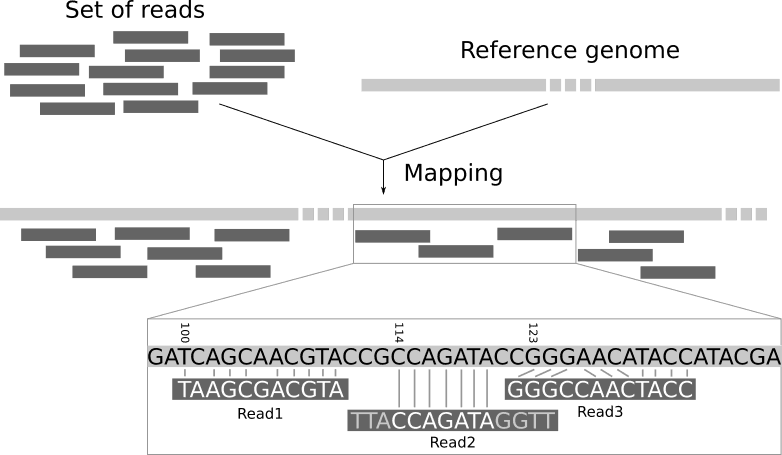
In this series we have looked at FASTQ files and quality scores, how to choose a human reference genome, and how to read a VCF. This guide fills the gap in the middle. After an aligner such as BWA-MEM, Bowtie2 or minimap2 places each read on the reference, the result is stored as a SAM, BAM or CRAM file. These are usually the largest files in a sequencing project, and almost every downstream step, from variant calling to RNA-seq counting, reads them.
It is also a timely moment to understand them. On 27 October 2026 the maintainers of HTSlib, the C library underneath samtools and bcftools, released version 1.25 with fixes for several security bugs, some of them in the code that reads alignment index files. We cover what that means for ordinary users near the end.
On this page
- One data model, three encodings
- The header: lines that start with @
- The 11 mandatory columns
- Decoding the FLAG
- Reading a CIGAR string
- MAPQ is not base quality
- Optional tags worth knowing
- A small, reproducible samtools check
- Six common mistakes
- Why to update HTSlib now
- What an alignment file cannot tell you
- Practical checklist
- Sources and further reading
One data model, three encodings
SAM, BAM and CRAM store the same information: a header plus one record per read alignment. They differ in how that information is written to disk.
- SAM (Sequence Alignment/Map) is plain tab-separated text. You can read it with
less, but it is large and slow to process. - BAM is the binary, BGZF-compressed form of the same records. It is the everyday working format and can be indexed (
.baior.csi) so tools can jump straight to a genomic region. - CRAM compresses further by storing mainly how each read differs from the reference rather than every base. Files are often considerably smaller than BAM, but decoding needs the exact same reference sequence used to write them. Its index is
.crai.
All three are defined by open specifications maintained by the GA4GH Large Scale Genomics work stream: the SAMv1 specification covers SAM, BAM and the BAI index, and a separate CRAMv3 document covers CRAM.

The header: lines that start with @
Like the ## lines of a VCF, the header is part of the data. The most important line types are:
@HD: format version (VN) and sort order (SO:coordinate,querynameorunsorted).@SQ: one line per reference sequence, with its name (SN), length (LN) and often an MD5 checksum (M5). These lines tell you which reference build the coordinates belong to.@RG: read groups, linking reads to a sample (SM), library (LB) and platform (PL). Variant callers rely on these.@PG: the programs and command lines that produced or modified the file, a built-in provenance record.
The 11 mandatory columns
Here is a small, made-up example of a paired read and a single read:
@HD  VN:1.6  SO:coordinate
@SQ  SN:chr1  LN:248956422
@RG  ID:lib1  SM:SAMPLE1  PL:ILLUMINA
@PG  ID:bwa  PN:bwa  CL:bwa mem GRCh38.fa R1.fq.gz R2.fq.gz
read001  99   chr1  1000  60  20M        =  1181  201   ACGTTGCAAGTCCGATTGCA  IIIIIIIIIIIIIIIIIIII  NM:i:0  RG:Z:lib1
read001  147  chr1  1181  60  20M        =  1000  -201  TTGACCGTAGGCATCAAGTC  IIIIIIIIIIIIIIIIIIII  NM:i:0  RG:Z:lib1
read002 0 chr1 2050 23 4S10M2I4M * 0 0 GGATCCTAGCTTACGAAGTT IIIII?????IIIIIIIIII NM:i:2 RG:Z:lib1- QNAME: the read (template) name. Both mates of a pair share it.
- FLAG: a number whose bits describe the read (explained below).
- RNAME: the reference sequence name, matching an
@SQline. - POS: the 1-based leftmost reference position of the aligned part of the read. Soft-clipped bases are not counted.
- MAPQ: mapping quality (explained below).
- CIGAR: how the read lines up with the reference.
- RNEXT and 8. PNEXT: the mate’s reference and position (
=means the same chromosome;*and0mean not available). - TLEN: the observed template (fragment) length, positive for the leftmost mate and negative for the other.
- SEQ: the read bases, always shown on the forward strand of the reference.
- QUAL: base qualities in the same Phred+33 encoding used in FASTQ.
Decoding the FLAG
FLAG is a sum of bits. The common ones are:
1paired;2mapped in a proper pair;4read unmapped;8mate unmapped16read on the reverse strand;32mate on the reverse strand64first read of the pair;128second read of the pair256secondary alignment;512failed QC;1024PCR or optical duplicate;2048supplementary alignment
So 99 = 1 + 2 + 32 + 64: a paired, properly paired first read whose mate is on the reverse strand. Its partner, 147 = 1 + 2 + 16 + 128, is the second read on the reverse strand. You never need to do this by hand: samtools flags 99 prints the meaning.
Reading a CIGAR string
A CIGAR is a list of lengths and operations. The ones you will meet most are M (aligned, which can be a match or a mismatch), I (insertion relative to the reference), D (deletion), N (skipped reference, typically an intron in RNA-seq), S (soft clip: bases kept in SEQ but not aligned), H (hard clip: bases removed from SEQ), and = / X (explicit match / mismatch).
In the example, 4S10M2I4M means: the first 4 bases are soft-clipped, 10 bases align, 2 bases are inserted, and 4 more align. The read is 20 bases long, but only 14 reference bases are covered. Because M hides mismatches, the NM tag (edit distance) or MD tag is where you see how many differences there are.
MAPQ is not base quality
MAPQ is a Phred-scaled estimate that the read has been placed in the wrong location: MAPQ 20 means roughly a 1-in-100 chance, MAPQ 60 roughly 1 in a million. It answers “is this the right place?”, not “are the bases correct?” or “how good is the alignment?”. In practice, MAPQ is calculated differently by each aligner, a value of 0 usually signals a read that fits equally well in several places (common in repeats), and 255 means the value is unavailable. Compare MAPQ thresholds only within the same aligner.
Optional tags worth knowing
After column 11 come TAG:TYPE:VALUE fields. Standard ones include NM (edit distance), MD (mismatch positions), AS (alignment score), RG (read group), SA (other parts of a chimeric, split read) and MM/ML (base modifications such as methylation, increasingly common with long-read data). Tags beginning with X, Y or Z are reserved for local use, so their meaning depends on the tool that wrote them.
A small, reproducible samtools check
With samtools installed (for example in the WSL2 setup described earlier), these commands cover most first-look checks:
# Which samtools and HTSlib versions am I running?
samtools --version

# Is the file intact (truncation, missing EOF block)?
samtools quickcheck -v sample.bam && echo "OK"

# Header: sort order, reference contigs, read groups, programs
samtools view -H sample.bam | less -S

# Sort by coordinate and index
samtools sort -@ 4 -o sample.sorted.bam sample.bam
samtools index sample.sorted.bam

# Quick summaries
samtools flagstat sample.sorted.bam
samtools idxstats sample.sorted.bam
samtools stats sample.sorted.bam > qc/sample.stats.txt

# Count primary, mapped reads with MAPQ >= 20
# (0x904 excludes unmapped, secondary and supplementary records)
samtools view -c -q 20 -F 0x904 sample.sorted.bam

# Look at one region
samtools view sample.sorted.bam chr1:1000000-1001000 | head

# Convert to CRAM against the same reference, then index
samtools view -C -T GRCh38.fa -o sample.cram sample.sorted.bam
samtools index sample.cram
For duplicate marking, the samtools documentation describes a collate → fixmate -m → sort → markdup sequence. As with VCFs, record tool versions, the reference FASTA with its checksum, and every command next to the outputs.
Six common mistakes
- Losing or swapping the reference for CRAM. A CRAM decoded against a different FASTA gives wrong bases or fails. Keep the exact reference (the
M5checksums in@SQhelp confirm it), and check that contig names match (chr1versus1). - Counting lines as reads. One read can have secondary and supplementary records, and unmapped reads are often kept in the file. Filter by FLAG before counting.
- Comparing MAPQ across aligners. A cut-off that suits one tool can be meaningless for another.
- Using an unsorted file or a stale index. Region queries need a coordinate-sorted file and an index created after the last change to it.
- Ignoring duplicates. PCR duplicates inflate coverage and can make a sequencing error look like a well-supported variant.
- Running old tools on files from elsewhere. See the next section.
Why to update HTSlib now
The 27 October 2026 advisory from the HTSlib maintainers lists several vulnerabilities in HTSlib 1.24 and earlier. Two are rated high severity: one in the code that reads .bai, .csi and .tbx index files, and one in the VCF reader when it is set to skip columns. The others are moderate or low. All are fixed in HTSlib 1.25 and backported to 1.24.1, 1.23.3, 1.22.4 and 1.21.3, and the advisory states there is no workaround. Earlier releases in 2026 separately fixed bugs in CRAM decoding.
In plain terms, a deliberately crafted file could crash a tool and, in the worst case, potentially be used to run code. For most readers the sensible steps are: run samtools --version, update through your package manager or conda channel to a patched release, be cautious with alignment and index files from unknown sources, and avoid processing such files with administrator privileges on shared servers.
What an alignment file cannot tell you
A BAM records the aligner’s best guess, given the reference you chose. Repeats and segmental duplications, regions where the reference differs from your sample, contamination and library artefacts can all produce confident-looking but wrong placements. Looking at reads in a viewer such as IGV, checking coverage and duplicate rates, and comparing aligners on difficult regions are good habits. In clinical settings, laboratories use validated pipelines and confirm important findings, for example by Sanger sequencing.
Practical checklist
- Run
samtools quickcheckand read the header before anything else. - Confirm the reference build and contig names in the
@SQlines. - Keep the exact reference FASTA alongside every CRAM.
- Check sort order and rebuild the index after any change.
- Decode FLAGs with
samtools flags; filter secondary and supplementary records before counting. - Choose MAPQ thresholds per aligner and document them.
- Use a patched HTSlib/samtools release (1.25, or a 1.21.3–1.24.1 backport).
Research and education note: This article explains file formats. It is not medical advice, and alignment files should not be used on their own to make decisions about diagnosis, treatment or genetic counselling.
Featured image: illustration of read mapping from the Galaxy Training Network tutorial “Mapping” by Joachim Wolff, Bérénice Batut and Helena Rasche, CC BY 4.0.
Sources and further reading
- Sequence Alignment/Map Format Specification (SAMv1), samtools/hts-specs
- Sequence Alignment/Map Optional Fields Specification (SAMtags)
- CRAM format specification (version 3.x)
- Li H, et al. The Sequence Alignment/Map format and SAMtools. Bioinformatics. 2009;25(16):2078–2079. doi:10.1093/bioinformatics/btp352
- Hsi-Yang Fritz M, et al. Efficient storage of high throughput DNA sequencing data using reference-based compression. Genome Research. 2011;21(5):734–740. doi:10.1101/gr.114819.110
- Bonfield JK, et al. HTSlib: C library for reading/writing high-throughput sequencing data. GigaScience. 2021;10(2):giab007. doi:10.1093/gigascience/giab007
- Danecek P, et al. Twelve years of SAMtools and BCFtools. GigaScience. 2021;10(2):giab008. doi:10.1093/gigascience/giab008
- Multiple vulnerabilities in HTSlib <= 1.24 (oss-security advisory, 27 October 2026)
- HTSlib 1.25 release notes
- samtools manual

A molecular biologist and aspiring bioinformatician with a passion for genomics, rare diseases, and precision medicine. With an MPhil in Molecular Biology and experience in genetics and genomics, he has contributed to clinical research projects on rare genetic disorders. He’s passionate about making genomic data meaningful — and ultimately helpful — for patients and clinicians alike.


Leave a Reply